
Real estate CRM
The management software for a real estate agency and its public showcase, built to be tested: from the acquisition of the assignment to the closing deed, with the right house reaching the right client.
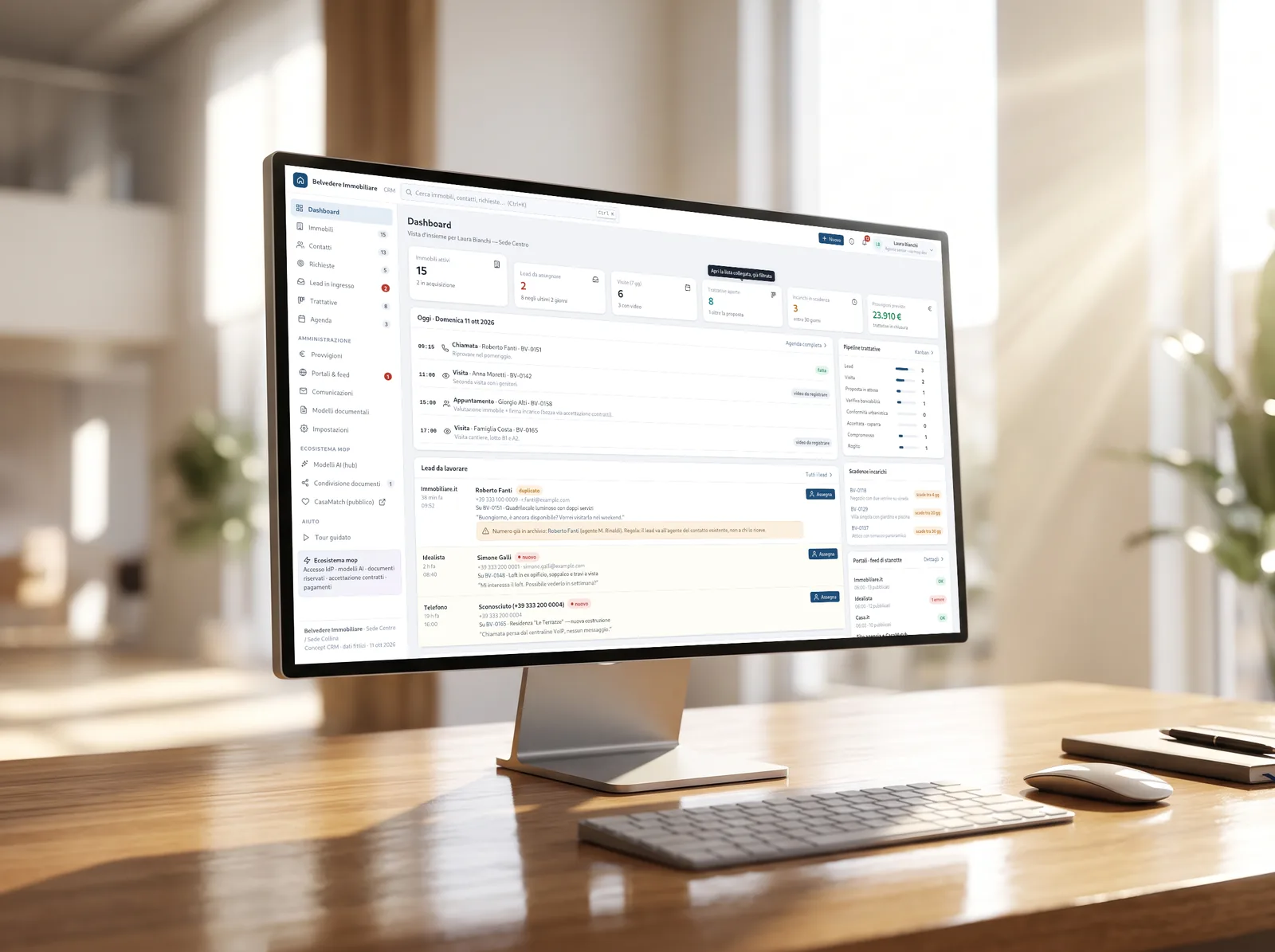
Two archives that need to meet
A real estate CRM is not a sales CRM: it maintains two mirroring databases, properties for sale or rent and requests from home seekers, and its value lies in matching them up. Around these are contacts, who change roles over time — sellers then buy — and activities: viewings, calls, deadlines.
The starting point was an analysis document: the flow from acquisition to the closing deed, three automations — publication on portals, lead intake, automatic matching — and ten customization points that every agency wants in their own way. The concept covers them one by one, in a demo that opens in the browser.
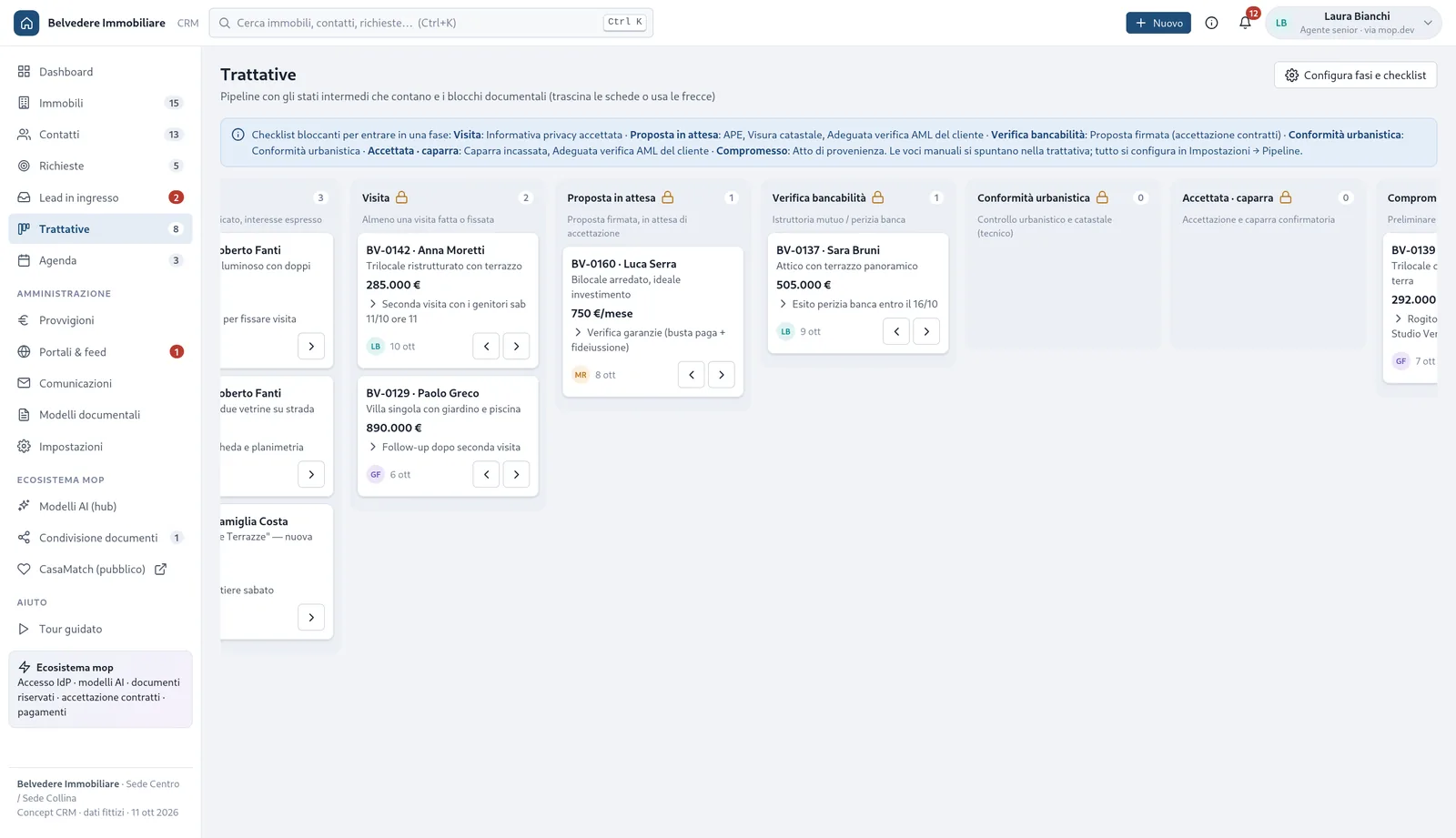
A deal does not move to the next stage without documents
Deals flow on a kanban with the intermediate stages that really matter: bankability check, urban compliance, deposit. Each phase has a checklist taken from a library — property documents, client checks, tasks — or written by hand, and each item is blocking or just a reminder.
If the property report or appropriate anti-money laundering verification is missing, the record does not enter «Proposal pending»: the kanban says what is missing instead of letting it pass. Phases and items are changed from settings, and the effect is immediate.
Ten customizations, none hidden
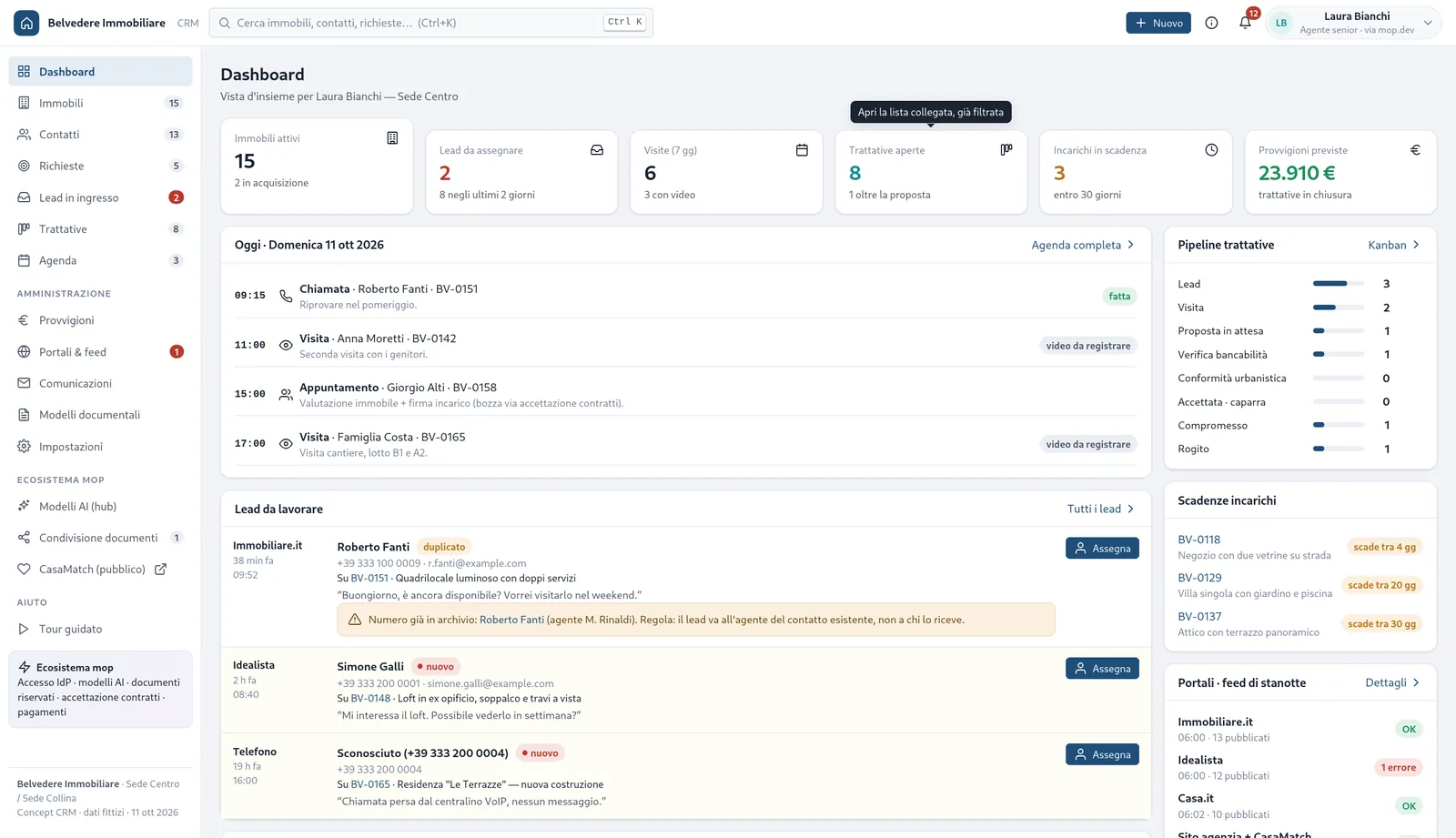
Each agency works its own way: the rules that usually live in a spreadsheet or in the owner's head are front and center, where they can be read and changed.
Leads with rules
Contacts from portals, from the site and from the phone arrive in a single queue — those from portals via their emails, read automatically; rules assign them by property, area and shift, and a number already in the archive returns to the agent following that client.
Single-point portals
One ad, multiple portals: Immobiliare.it in real time on its public specifications, Idealista and Casa.it as a single group, minor portals with a nightly feed. The log says what has been published and what has been rejected.
Readable commissions
Split between agents, referrer, structure share and thresholds: first the rules, clearly written, then a compact simulator to test them on a deal.
Auto-filling documents
Assignment, proposal, visit sheet: templates with fields taken from the property and the client, to be sent for signature with a second factor linked to the document.
Privacy and anti-money laundering
Each contact carries the consents and the due diligence status; the stages that require them check them before letting the negotiation proceed.
More locations, more roles
Permissions by location and role, sharing between agencies, different fields for each property type: from apartments to warehouses.
The showcase that learns from those who view it
The public page shows one house at a time: swipe right if you like it, left if you don't, or open the full listing with gallery, 3D map, and 360° tour. After each choice, the next card follows learned preferences — area, type, floor, condition, energy class, features, price, and square footage.
Every three cards, one different one arrives on purpose, another area or another type, so the profile doesn't close in on itself. When the visitor sends their preferences, they become a lead in the CRM with a pre-written profile: there is an example one in the demo.
No photo, no dependency
Everything you see is generated in the browser from the demo data: no images of real houses, no external libraries, no server other than the one delivering the files.
Photos and drawn floor plans
Each type has its SVG photo and its floor plan, generated from the property file: change the data, and the drawing changes.
360° tour and viewer
A room tour on canvas, with dragging, zoom, phone gyroscope, and a split-screen mode for headsets where the phone is inserted.
3D neighborhood map
Blocks and property built in 3D CSS, to be rotated and enlarged: you can understand where the house is before going there.
Recorded viewings
A field for viewings conducted with camera glasses: device, client consent, video bookmark, summary, and sharing. In the demo, the video is simulated.
Seven languages, two themes
The same languages as the platform, including right-to-left Arabic, with country dates, numbers, and currencies; light, dark, or system theme, without flashing on load.
Help inside the page
Hints on every command and a guided tour with a cursor that moves on its own, opens pages and presses real buttons.
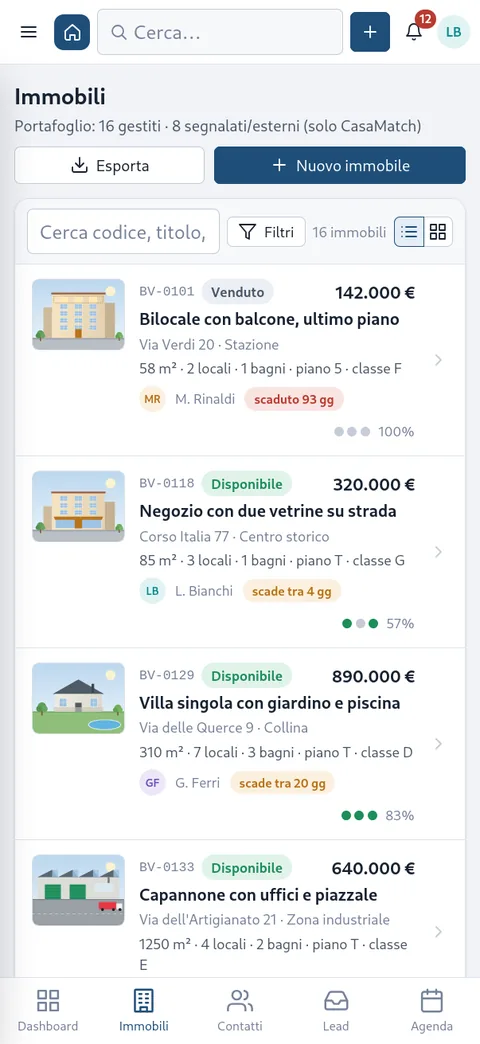
The phone is not a narrow computer
Below 760 pixels tables become lists designed for the thumb: thumbnail, code and status, price and address where the eye looks for them. The kanban scrolls one phase per screen, the agenda becomes a strip of days, filters are behind a button and windows slide up from the bottom.
It is the agent's phone in the car between visits, not a scaled-down preview: every page has been redesigned for that screen.
The hard parts already exist
The concept is designed to live on the mop.dev platform, and the buttons simulated in the demo correspond to features the platform already has: login with mop.dev and two-factor authentication, the AI model hub behind the ✨ buttons, confidential documents with expiring links, contract acceptance with receipts, payments, and consent-based statistics.
For this reason, the demo can be honest: the AI responses and signatures are prepared texts, but the path they show is the real one.
- Real in the platformAccess and 2FA, AI model hub, confidential documents, contract acceptance, payments, statistics.
- Simulated in the demoAI responses, signatures, sending feeds to portals, visit videos.
- To be builtThe real archive behind the screens, the agreements and integrations with portals, the reading of lead emails and immersive virtual reality.
Counted, not estimated
What it is, what it is not
It is a concept: the agency, the agents, and the clients are fictional, changes remain on the page and disappear upon reloading, and the CRM worksheets are in Italian even when the interface is in another language.
Integrations with portals follow a verification of the actual status: in Italy only Immobiliare.it publishes specifications for management software, Idealista and Casa.it are a single group reachable by partners, and no portal returns contacts via an API — they arrive by email. The demo was corrected accordingly: no promised portal statistics, no ads copied from other sites.
Maps and floor plans are schematic; virtual reality is split-screen with the gyroscope, not immersive. The automatic control opens every page and tests the main interactions, but does not judge the appearance: that is observed.
The screens are already the contract
The actual product puts an archive behind the same screens and connects the simulated buttons to the platform's functions. Every screen of the demo is a piece of specification that the agency has already tried with their own hands.
The same process applies to any business working on matching two archives — with a dedicated quote.
Open the demo, then let's talk
It opens without registering, from phone or computer, and starts with a guided tour. If you manage an agency, the best way to decide is to try it.